The Mac Mini Has a Thunderbolt Port. The Simulator Doesn't Know That.
I recently set up MIMOLETTE, one of my Mac Mini home lab nodes, as an iOS build server. The machine has a UGREEN Mac Mini M4 dock with an internal M.2 slot, into which I’ve put a Crucial P310 2TB NVMe SSD — PCIe Gen4, up to 7,100 MB/s read. Fast storage, externally mounted, ready to absorb the comically large iOS simulator runtimes that Xcode insists on accumulating.
You can probably guess where this is going.
The setup
iOS Simulator devices live in ~/Library/Developer/CoreSimulator/Devices/. The runtimes themselves (the actual disk images for each iOS version) can take 5–10 GB per SDK, and since I’m building for multiple iOS versions, that adds up quickly. The internal SSD on the Mac Mini M4 is not enormous, so the plan was simple: put the Devices directory on the external volume, symlink or redirect accordingly, done.
The external volume is an APFS partition, mounted at /Volumes/extra-vieille. Owned by my user. Correct permissions. The straightforward part worked fine.
The failing part was everything else.
The error
Error copying sample content to path /Volumes/extra-vieille/Simulators/Devices/<UUID>/data : "You don't have permission to save the file "<UUID>" in the folder "Devices"." NSUnderlyingError: NSPOSIXErrorDomain Code=1 "Operation not permitted"This is not a POSIX permission error, despite the POSIX error code. The directory was drwxr-xr-x, owned by my user. The process writing to it (com.apple.CoreSimulator.CoreSimulatorService, an XPC service) also runs as my user. By every traditional Unix measure, this should work.
The actual cause is TCC — macOS’s Transparency, Consent, and Control framework. The CoreSimulatorService XPC process lacks NSRemovableVolumesUsageDescription in its Info.plist, which means macOS never prompts for consent to access removable volumes, and silently denies writes to them. No dialog. No log entry you’d easily find. Just EPERM.
Seven things that didn’t work
I tried the following, in roughly increasing order of desperation:
1. sudo diskutil enableOwnership /Volumes/extra-vieille
The volume was mounted noowners. Enabling ownership felt like the right first move. It wasn’t. TCC doesn’t care about ownership.
2. Full Disk Access for Xcode
Added /Applications/Xcode.app to System Settings > Privacy & Security > Full Disk Access. XPC services launched by launchd don’t inherit FDA grants from their parent application. This does nothing.
3. Full Disk Access for simdiskimaged
simdiskimaged is the process that manages simulator disk images. Sounds relevant. It’s not the process that writes device files. CoreSimulatorService is.
4. Full Disk Access for the CoreSimulatorService XPC bundle
This is where things get fun. The System Settings file picker dims .xpc bundles. You cannot add them through the standard UI. The exact process that needs a TCC grant can’t receive one through the exact UI designed for granting TCC permissions.
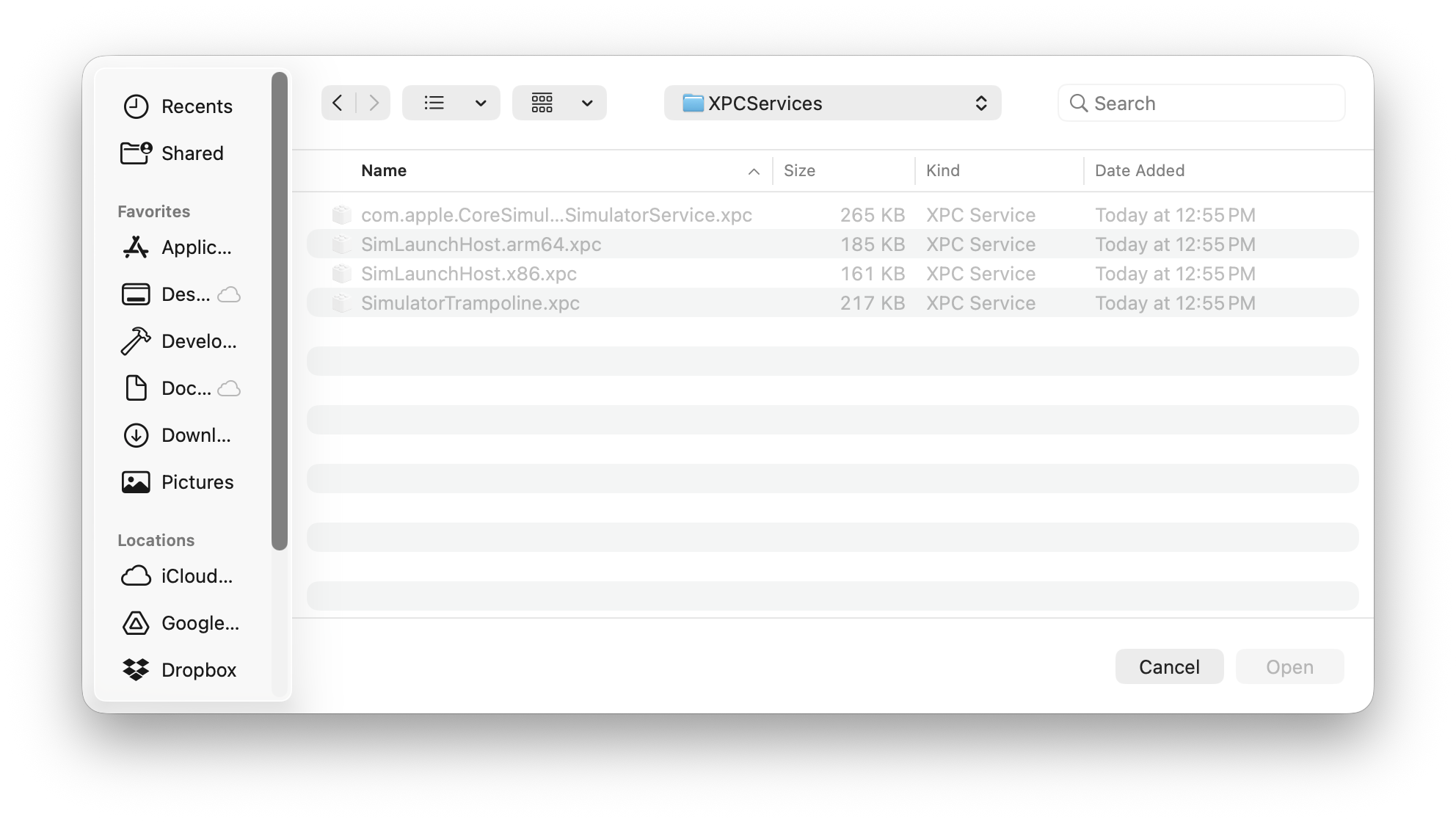
5. Dragging the CoreSimulatorService binary directly into the FDA list You can get to the actual binary inside the XPC bundle through Finder and drag it in. I did this. TCC grants on a bare binary don’t propagate to the XPC service process, because XPC services are matched by bundle identifier, not executable path. Nice try though.
6. Synthetic firmlink via /etc/synthetic.conf
synthetic.conf with a two-column entry creates a synthetic symlink at boot time, not a true APFS firmlink. I added SimulatorDevices → /Volumes/extra-vieille/Simulators/Devices, rebooted, then symlinked ~/Library/Developer/CoreSimulator/Devices to /SimulatorDevices. TCC resolves through symlinks to the underlying path. Still blocked.
Side effect: after creating synthetic.conf referencing the external volume and rebooting, the machine required SSH to a special unlock mode before it would boot normally. Possibly FileVault + synthetic entries that reference volumes not yet mounted at early boot. I removed synthetic.conf immediately and do not recommend this path unless you enjoy unexpected boot behavior.
7. bindfs via fuse-t This was the most promising approach. The theory: mount the external volume through a FUSE filesystem at the standard local path, so TCC sees a local path and the removable-volumes check never fires.
I installed fuse-t (no kernel extension required), built bindfs 1.18.4 from source against the fuse-t headers (pkgconf needed some manual header symlink surgery), and mounted:
bindfs /Volumes/extra-vieille/Simulators/Devices \ ~/Library/Developer/CoreSimulator/DevicesThe resolved path was now genuinely local. The removable-volumes TCC check no longer triggered. CoreSimulatorService still returned “Operation not permitted.”
It turns out TCC’s sandbox for this XPC service doesn’t just block removable volumes — it blocks writes to any non-native filesystem mount. The FUSE mount isn’t a real APFS volume, and the XPC sandbox knows it.
Resolution
I deleted all the symlinks, unmounted everything, and created a plain local directory:
umount ~/Library/Developer/CoreSimulator/Devicesrmdir ~/Library/Developer/CoreSimulator/Devicesmkdir ~/Library/Developer/CoreSimulator/Devicesxcrun simctl create worked immediately.
The simulator runtimes live on the internal disk. The fast NVMe in the dock holds my entire developer environment, source code, and (maybe) Android emulator images, unless Android Studio is as obstinate as Xcode.
The actual problem, stated plainly
Apple ships Xcode with simulator runtimes that are multiple gigabytes each. The Mac Mini M4 has a Thunderbolt 4 port. As of macOS 26, there’s no supported path for putting those runtimes on external storage, because:
CoreSimulatorServicehas noNSRemovableVolumesUsageDescription- There is no documented configuration key for a custom device storage path
- XPC services cannot be added to Full Disk Access through the standard UI
- The XPC sandbox blocks non-native filesystem mounts in addition to removable volumes
Whether this is an oversight, a constraint that predates fast external storage being common, or something on a future roadmap — I don’t know. What I do know is that on macOS 26, you can’t do it today.
I filed feedback at feedbackassistant.apple.com under Developer Tools > Simulator in case it’s useful signal.
Cleanup
If you went down any of these paths, here’s what to clean up:
- Remove
/etc/synthetic.confbefore rebooting (seriously) brew uninstall --cask fuse-tif you installed itbrew untap gromgit/fusesudo rm /usr/local/bin/bindfsif you built it from sourcesudo rm /usr/local/include/fuseif you created the header symlink- System Settings > Privacy & Security > Full Disk Access: remove
simdiskimagedand theCoreSimulatorServicebinary entry (they did nothing; no need to keep them) - Keep
pkgconf— it’s useful for other things
MIMOLETTE is a refurbished M4 Mac Mini (10-core CPU, 10-core GPU, Gigabit Ethernet), running macOS 26 and Xcode 26.4.